
The Google Business Profile Checklist for Contractors: 12 Fixes to Show Up in the Local Pack
Most contractors set up GBP once, upload a couple of photos, and call it done. Here's what Google actually uses to rank you, including the 2026 updates most articles haven't caught up to yet.
Most contractors set up their Google Business Profile once, upload a couple of photos, and call it done. Then they wonder why their competitor, who does worse work and charges more, keeps showing up first.
Here is the actual checklist. Not a generic "fill out your profile" post, this covers the things Google changed in 2026 that most articles haven't caught up to yet.
Work through this in order. Each section builds on the one before it.
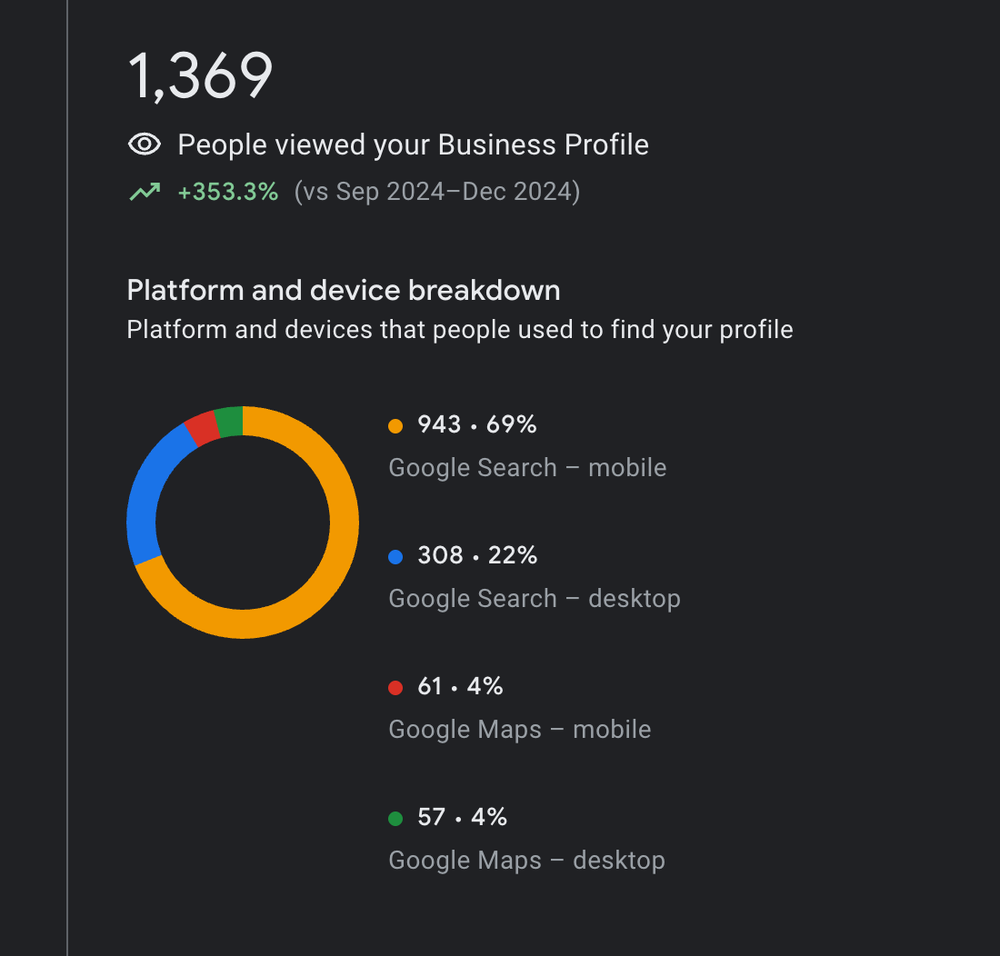
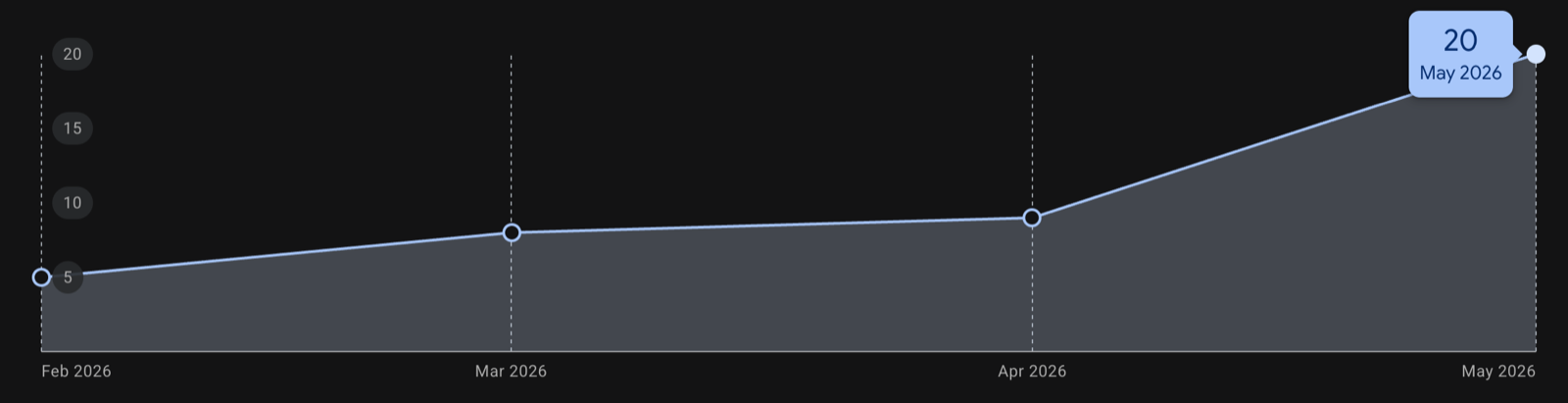
This is not theory. Here are two profiles I work on. One Lehigh Valley contractor's profile reached 1,369 views, up 353%, most of them from people searching on a phone nearby. Another contractor went from 5 calls a month from their profile to 20.
- Claim and verify your Google Business Profile
- Get your primary category right
- Fill out your Services tab
- Write a description that sounds human
- Photos, at least 10, updated regularly
- Reviews, consistency beats quantity
- Answer common questions on your website
- Posts, weekly cadence
- NAP consistency and local citations
- How to track leads from your GBP
- Integrating GBP with your website
- The 2026 AI update most contractors missed
1. Claim and verify your profile, the step most contractors skip
Before any of the optimization below matters, you need to actually own the profile. A surprising number of contractors either never claimed theirs (one exists, auto-generated by Google from public data), or they claimed it years ago and lost access when they changed phones or emails.
The quick claim process:
- Go to google.com/business and sign in with a dedicated business email, not your personal Gmail. Something like info@yourbusiness.com or owner@yourbusiness.com. Ownership tied to a personal account you might lose is a recipe for losing your profile later.
- Search for your business by name. If Google has already auto-created a profile (common for active businesses with phone numbers and addresses in public records), click "Claim this business." If there's no existing profile, create one fresh.
- Complete the basic details. Business name exactly as it appears on your legal registration. No keyword stuffing like "ABC Plumbing, Lehigh Valley Plumber Best Plumbing Company." Google penalizes that hard. Just the clean legal name.
- Choose your verification method. Google usually offers postcard (5-14 days with a PIN), or for some verified businesses, instant phone, video, or email verification. Video verification has become more common in 2026, a short recorded walkthrough of your business or service area.
- Enter the PIN or complete the video call. Once verified, you have full control.
Critical step for most contractors: service-area businesses should hide their business address. If you're working at customer locations (you go to them), select "I deliver goods and services to customers at their locations" during setup. Google will ask you to list service areas instead of displaying a visible address. A hidden address with listed service cities looks more professional than a residential address on your listing.
2. Get your primary category right, this is the biggest lever you have
Primary category is one of the strongest Local Pack ranking signals Google uses. You only get one, and it needs to match your most valuable service, not the broadest one, not the most popular one, the one you most want to rank for.
- HVAC: "HVAC Contractor" (not "Air Conditioning Repair" or "Furnace Repair")
- Roofing: "Roofing Contractor" (not "Roofing Supply Store")
- Plumbing: "Plumber" (not "Drainage Service")
- Landscaping: "Landscaper" (not "Lawn Care Service")
- Painting: "Painter" (not "House Painter", yes, Google treats these differently)
Add secondary categories for everything else you do. There's no penalty for having 5-8 secondary categories, and they expand your ranking surface area. Don't leave them blank.
3. Fill out your Services tab, this is what triggers "Provides:" justifications
In 2024-2025, Google started showing justifications under listings in the Local Pack, small snippets like "Provides: furnace installation" or "Provides: deck building." These appear directly under your business name and make your listing stand out.
The most reliable way to trigger them: fill out the Services tab with individual service names and short descriptions.
Don't do this: One entry that says "HVAC Services, We do heating and cooling."
Do this instead:
- Furnace Installation
- AC Replacement
- Heat Pump Installation
- Emergency Heating Repair
- Ductless Mini-Split Installation
One service per line, with a 1-2 sentence description for each. This also feeds into what Google's AI Overviews pull when someone asks "who does furnace installation near me."
4. Write a description that sounds like a person, not a press release
You get 750 characters. Use the first 250, that's what shows before the "More" cutoff.
Include: what you do, who you do it for, your service area, and one thing that makes you different. Don't keyword-stuff. Google's algorithm can tell, and more importantly, customers can tell.
Weak: "ABC Plumbing provides plumbing services in the Lehigh Valley area. We offer drain cleaning, water heater installation, and emergency plumbing. Call us today for all your plumbing needs."
Better: "Family-run plumbing company serving Allentown, Bethlehem, and the Lehigh Valley since 2009. We specialize in water heater replacement, drain cleaning, and bathroom remodels, same-day service for emergencies. No surprises on the invoice."
5. Photos: at least 10, updated regularly, never stock
Google's local algorithm uses photo engagement as a signal. Profiles with more photos, particularly recent ones, get more clicks. More clicks reinforce rankings. It compounds.
What to upload:
- Job site photos: before/after pairs for completed work
- Team photos: technicians in uniform, vehicles with your logo
- Process photos: equipment being installed, work in progress
- Customer photos: reviews that include photos carry more weight
Upload at least 1-2 photos per week. Geo-tagged photos from job sites (taken on an iPhone or Android with location services on) send a stronger local signal than photos uploaded from a desktop.
Delete any stock photos or generic images. Google has gotten good at identifying them, and they drag down your photo engagement rate.
6. Reviews: consistency beats quantity
This is the one most contractors get wrong. They do a push, text 20 people at once, get 15 reviews in a week, then nothing for 3 months. That pattern can actually trigger a ranking dip.
Google's algorithm appears to reward consistent velocity over bursts. Two to four new reviews per month, every month, outperforms 20 reviews in January and zero through March.
A few things that make reviews more powerful:
- Service specificity: A review that says "replaced our furnace" is more valuable than one that says "great service." When you ask for reviews, tell customers it helps to mention what you did for them.
- Response rate: Respond to every review, positive and negative. Businesses that respond to reviews rank higher than those that don't. Keep responses short and avoid copy-paste templates.
- Star distribution: A 4.7 average with 80 reviews typically outranks a 5.0 average with 12 reviews. The algorithm trusts natural distributions.
The easiest way to get reviews: text customers within 24 hours of completing a job with a direct link to your GBP review page. Response rates drop significantly if you wait more than a day.
7. Q&A is gone, so answer common questions on your website
Google has quietly removed the owner Q&A tools from most Business Profiles. On nearly every profile I manage, the option to seed and answer questions yourself simply is not there anymore. If an older guide tells you to fill out your Q&A, check your profile first, because odds are it no longer exists.
The questions did not go away, though. Homeowners still ask them, and Google and AI tools still go looking for answers. So put those answers where they still count: a visible FAQ on your website, on the service pages where the question actually comes up. Answer these in plain language:
- Do you offer free estimates?
- Are you licensed and insured?
- Do you offer emergency or same-day service?
- What areas do you serve?
- Do you offer financing?
- How long have you been in business?
Keep the FAQ as normal text on the page, not hidden in a click-to-open accordion, so both people and search engines can read it. This is what gets pulled into AI answers when someone asks a specific question about your business.
8. Posts: once per week, don't overthink it
GBP posts don't carry the ranking weight they did in 2022. But they're still worth doing for two reasons: they show up in AI Overviews when someone searches for your business, and they feed profile completeness signals.
Keep them simple: a job photo, a one-sentence description of the work, and a call-to-action button. Don't spend more than five minutes on each one. One post per week is enough.
Offers and events posts get slightly more engagement than standard posts, so use them for seasonal promotions.
9. NAP consistency and local citations, the silent ranking factor
NAP stands for Name, Address, Phone. Google's local algorithm cross-references these across the web to decide whether you're a legitimate, established business. If your name is spelled three different ways (ABC Plumbing, ABC Plumbing LLC, A.B.C Plumbing) across Yelp, BBB, and your website, Google's confidence drops.
Same with your phone number. Yelp has (610) 936-1234, your GBP has 610-936-1234, BBB has 6109361234. Google can usually reconcile those, but inconsistencies still hurt. Pick one exact format and use it everywhere.
The citation sites that actually matter for contractors:
- Google Business Profile
- Bing Places for Business
- Apple Maps Connect
- Yelp
- Yellow Pages / YP.com
- BBB.org (accreditation adds extra authority)
- Angi (formerly Angie's List)
- HomeAdvisor / Thumbtack
- Manta
- MerchantCircle / Hotfrog / Foursquare
- Industry-specific: Houzz, Porch, HomeStars
- Local: Chamber of Commerce, regional business directories
You don't need to be on every single one. Hitting the top 10-15 builds the citation foundation Google wants to see. The work is tedious, block 2-3 hours on a weekend, submit identical NAP to each, done. Use the exact same business description paragraph across every listing. Consistency in description language is another signal Google uses to confirm the same legitimate business is being referenced.
10. How to actually track leads from your GBP
This is where most contractors leak value. They optimize their GBP, calls start coming in, and they have no idea which leads came from Google vs. a referral vs. Facebook vs. a yard sign. Without attribution, you can't tell what's working, and you'll stop doing the right things because you can't see the return.
Three things to set up:
1. GBP Insights (built-in, check it weekly)
Inside your GBP dashboard, Google shows you: how many times your profile appeared in search, how many clicked through to your website, how many called directly from the listing, how many requested directions, and what search queries triggered you. This alone tells you which keywords are driving visibility.
Two patterns to look for: queries where you're getting impressions but zero clicks (your snippet isn't compelling enough), and queries where you're getting clicks but no calls (your website or trust signals need work).
2. A dedicated tracking phone number
Use a dedicated number on your GBP that forwards to your main business line. CallRail, Google Voice (free), or HighLevel's built-in call tracking will show you exactly which calls came from the GBP vs. your website vs. ads. For contractors, this matters because you can finally answer "is my GBP earning its keep?" with data instead of gut feel.
Important: the phone number on your GBP must still be a real phone number that's consistent with your NAP elsewhere. Don't swap it every few weeks. Once you've set a tracked number, keep it.
3. CRM tagging at the point of call
When a lead calls or submits a form, tag them in your CRM with the source. "Source: Google Business Profile." Tag again when they close: "Closed: Yes. Value: $4,200." Over 3-6 months, this builds a picture of: GBP brought in X calls, X% closed, total value Y. Now you can answer whether the work is worth it.
This is the step that separates contractors who run marketing by gut feel from ones who actually know what's working. It takes 30 seconds per lead. Worth it.
11. Integrating your GBP with your website, the technical stuff that compounds
Your GBP and your website should reinforce each other. Most contractors treat them as separate things. Integrated, they signal consistency to Google and strengthen both.
Four specific integrations worth doing:
1. LocalBusiness schema on your website
Add LocalBusiness structured data (JSON-LD) to your homepage and contact page. This small snippet of code tells Google: "here's my business name, address, phone, hours, service area, and categories, structured so your algorithms can parse it." It reinforces what your GBP says and helps Google trust the connection.
If your site is in GoHighLevel, WordPress, Webflow, or pretty much any modern platform, schema can be added via a custom code block. It's a one-time setup, about 15 minutes. Validate it with Google's Rich Results Test tool.
2. Embedded Google Map
Embed a Google Map on your contact page. It's free, takes 2 minutes from Google Maps. It reinforces the geographic signal and gives users a clear sense of where you operate. For service-area businesses, a service area map is better than a pinpoint on your home address.
3. Review widget on your website
Display your actual Google reviews on your website using a widget (Elfsight, Trustindex, Romw, or similar). Two benefits: social proof on your site, and an additional indexable instance of your review content. Some widgets also support Review structured data, which can get star ratings into your search snippets.
4. Consistent contact info across both
Your website's contact page should show the exact same phone number, name, and service area as your GBP. Not close, identical. Any difference is a mismatch Google has to resolve, and resolution defaults to "lower confidence, lower ranking."
None of this is glamorous. It's housekeeping. But this kind of consistency is what moves a contractor from "ranks poorly, gets a few impressions" to "ranks top 3 in the local pack, fields calls daily."
12. The 2026 update most contractors haven't heard about yet
Google's AI Mode and AI Overviews now pull heavily from structured GBP data when answering questions like "best HVAC contractor near me" or "who installs mini-splits in Allentown." This is a significant shift from traditional Local Pack rankings.
What helps you show up in AI Mode:
- Services tab completeness: The more specific your services are, the more queries you can match
- Review text: AI pulls service and quality signals directly from review text, which is another reason to encourage specific reviews
- Your website's schema markup: GBP and your website's structured data work together. A connected entity (GBP, website, and schema all pointing to the same business) ranks better than a GBP that's an island.
- Consistent NAP: Name, address, and phone must match exactly across GBP, your website, Bing Places, Apple Business Connect, and any directory listings
Proximity matters less in AI Mode than in traditional Local Pack. A well-optimized profile across town can outrank a mediocre profile two blocks away. That's actually good news if you do the work.
This is the foundation. It's not the whole system.
GBP is one piece, it works best when it's connected to a website built to convert, a local SEO strategy that builds citation consistency, and paid ads that put you in front of people who are ready to book. If you want help building that for your contracting business, that's what I do.
Book a free strategy call →Frequently Asked Questions
How do I get my contracting business to show up in the Google Local Pack?
Start with the right primary category, complete your Services tab with individual service names and descriptions, upload at least 10 photos, and build a steady stream of reviews that mention the type of work done. Relevance and completeness tell Google your profile deserves to rank.
How many Google reviews does a contractor need to rank?
There's no magic number, but 10-20 reviews is a baseline. What matters more than quantity is consistency, 2-4 reviews per month beats 20 reviews in one week followed by months of silence. Google treats sudden review bursts as a spam signal.
Does Google Business Profile category matter for contractors?
Yes, primary category is one of the strongest Local Pack ranking signals. You get one primary category, so it should match your highest-value service. Add secondary categories for everything else. Leaving them blank is leaving ranking surface area on the table.
What are GBP justifications and how do contractors get them?
Justifications are the snippets under your listing in the Local Pack, "Provides: AC installation" or "Has online appointments." Filling out your Services tab with individual service names is the most reliable way to trigger them.
How often should contractors post on Google Business Profile?
Once per week is enough. Posts don't carry the same ranking weight they did a few years ago, but they contribute to profile completeness and show up in AI Overviews. A job photo and one sentence takes five minutes.
How do I claim a Google Business Profile for my contractor business?
Go to google.com/business, sign in with a dedicated business email (not personal Gmail), search for your business name, and click "Claim this business." If no existing profile exists, create one. Verify via postcard, phone, video, or email depending on what Google offers. Service-area contractors should hide their address during setup and list service areas instead.
What is NAP consistency and why does it matter?
NAP stands for Name, Address, Phone. Google cross-references your business NAP across the web to confirm legitimacy. Inconsistent spellings, formats, or phone number variations across directories reduce Google's confidence in your business and hurt local ranking. Pick one exact format and use it everywhere: GBP, Bing Places, Yelp, BBB, Apple Maps, and industry directories.
How do I track which leads came from my Google Business Profile?
Use three layers. GBP Insights (built-in, shows impressions, clicks, calls, direction requests). A dedicated tracking phone number that forwards to your main line (via CallRail, Google Voice, or CRM-provided). CRM source tagging when calls come in. Together these let you see which leads came from GBP, which close, and total revenue from the channel.
How do I connect my Google Business Profile to my website for better rankings?
Four integrations matter. Add LocalBusiness schema JSON-LD to your homepage and contact page. Embed a Google Map on your contact page. Display Google reviews on your site via a widget (Elfsight, Trustindex, or similar). Keep NAP details exactly identical between GBP and your website. Any mismatch lowers Google's confidence in your entity.
Do I need a physical office for a Google Business Profile?
No. Service-area businesses can register with a home address and hide it from the public. Google still needs a real street address for verification, but customers only see your listed service areas. Select "I deliver goods and services to customers at their locations" during setup to hide the address.